Article
Jan 17, 2026
Stop Using Gmail for Your Business: The Simple Email Fix That Can 2-3x Your Lead Response and Bookings
Most ‘bad leads’ aren’t bad, they’re reacting to your email identity and response process. Here’s how switching from Gmail to a branded address can dramatically boost replies and bookings.
Stop Using Gmail for Your Business: The Simple Email Fix That Can 2-3x Your Lead Response and Bookings
TL;DR
Using Gmail/Yahoo/Hotmail for client communication makes your business look less legitimate, reduces inbox placement, and quietly kills response rates.
A branded email (name@yourbusiness.com) plus faster replies can 2–3x responses and bookings from the same leads.
You can still work inside Gmail-just forward your domain email into it and send as your professional address.
Add even a basic follow‑up (one or two check‑ins) and you’ll often move from “10 leads → 1 booking” toward 2–3 bookings without spending more on ads.
As a fractional CxO, part of my job is pattern‑recognition: seeing the same issues show up across very different businesses, then helping founders understand what’s really going on.
One of the most consistent patterns I’ve seen is this:
Owners are convinced they have a lead quality problem, when what they really have is an email identity and response process problem.
If you’re planning to start-or already running-a service‑based business, this is one of those unglamorous operational details that quietly separates the owners who struggle from the ones who scale.
The problem: your email address is a trust signal, whether you like it or not
Most new owners default to a free email account:
It’s free, familiar, and feels harmless.
But to a cold prospect who just found you on Google, Instagram, or a directory, that email address is the first real proof of whether you’re a serious business or a side gig.
Data backs this up:
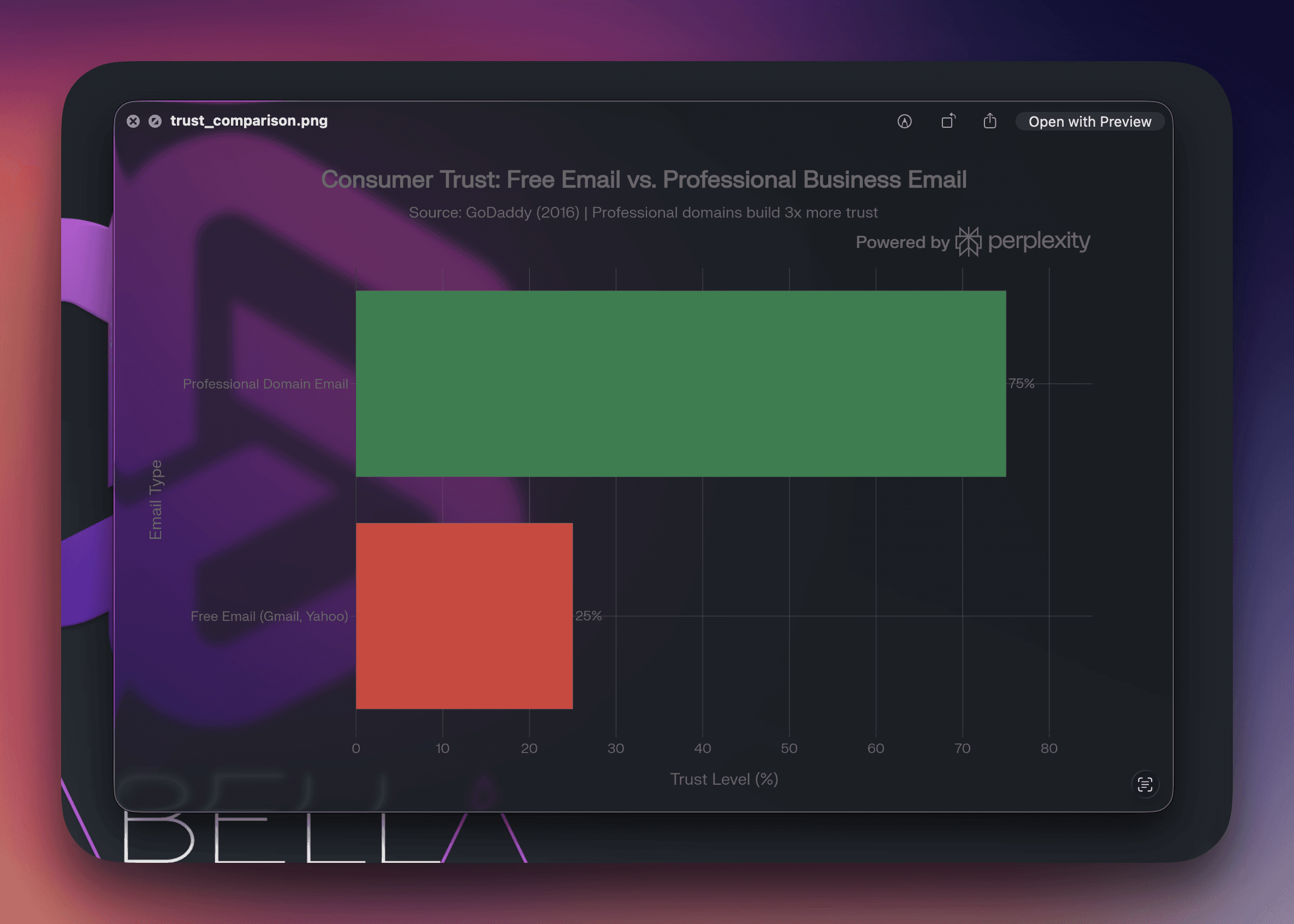
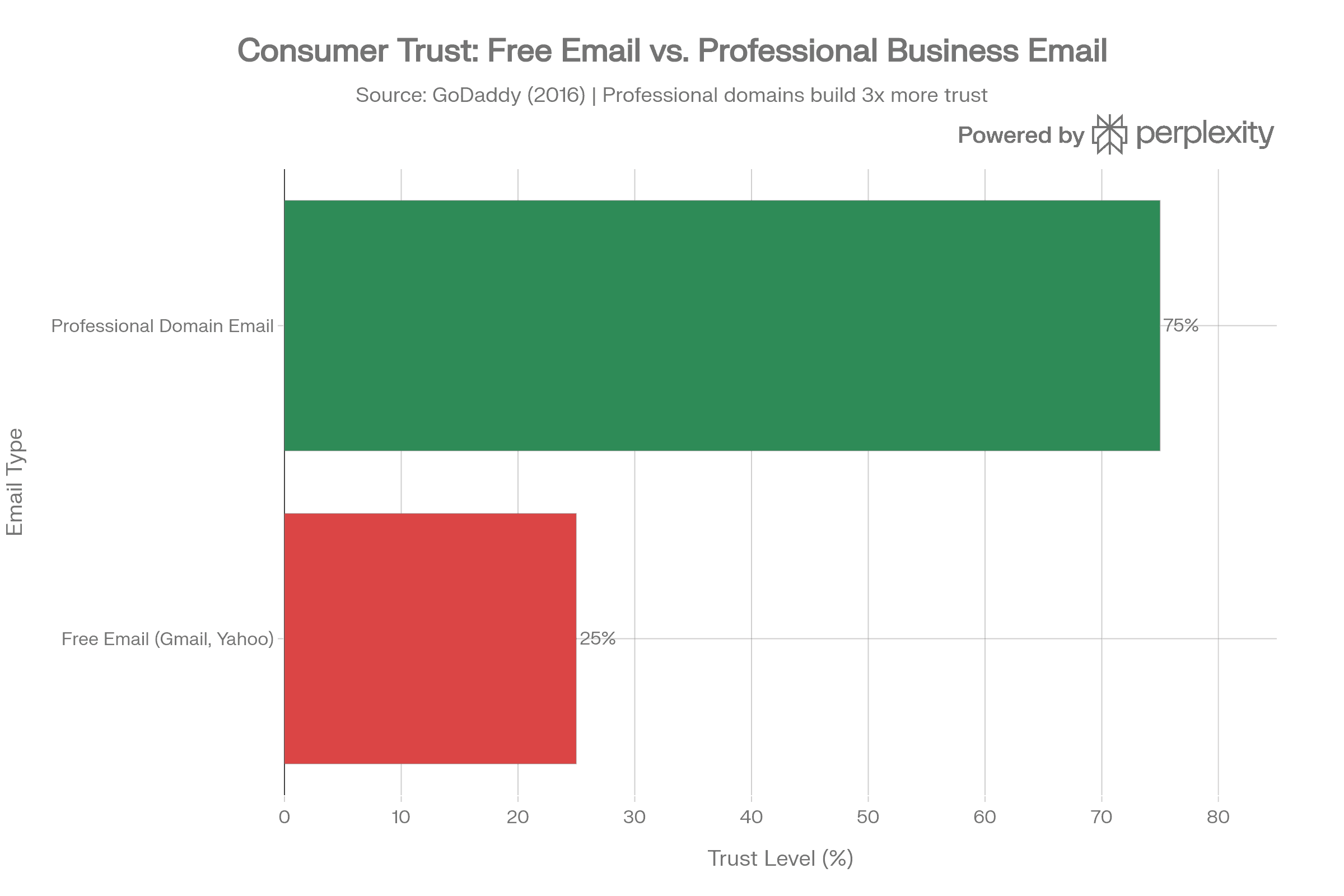
In a GoDaddy survey, 75% of consumers said a domain‑based email that matches the website (like name@yourbusiness.com) is a key factor in trusting a small business.
When they see a free address on a quote or invoice, roughly one‑third of people immediately doubt the company’s professionalism and legitimacy.
For local and service‑based businesses, that matters. You’re asking strangers to:
let you into their home or event
trust you with deposits and card details
believe you’ll show up when you say you will
A free email address quietly says, “This might be a side hustle.”
A professional email address quietly says, “This is a real business that plans to be here tomorrow.”
The hidden math: why “10 leads, 3 replies, 1 booking” isn’t fate
If you talk to enough founders, you hear the same story:
“For every 10 leads, maybe 3 people reply and 1 actually books. I guess that’s just how leads work.”
From the outside, it looks like a lead quality problem.
Under the hood, two things are usually happening the moment you reply from a free account.
1. Deliverability: does your email reach the inbox at all?
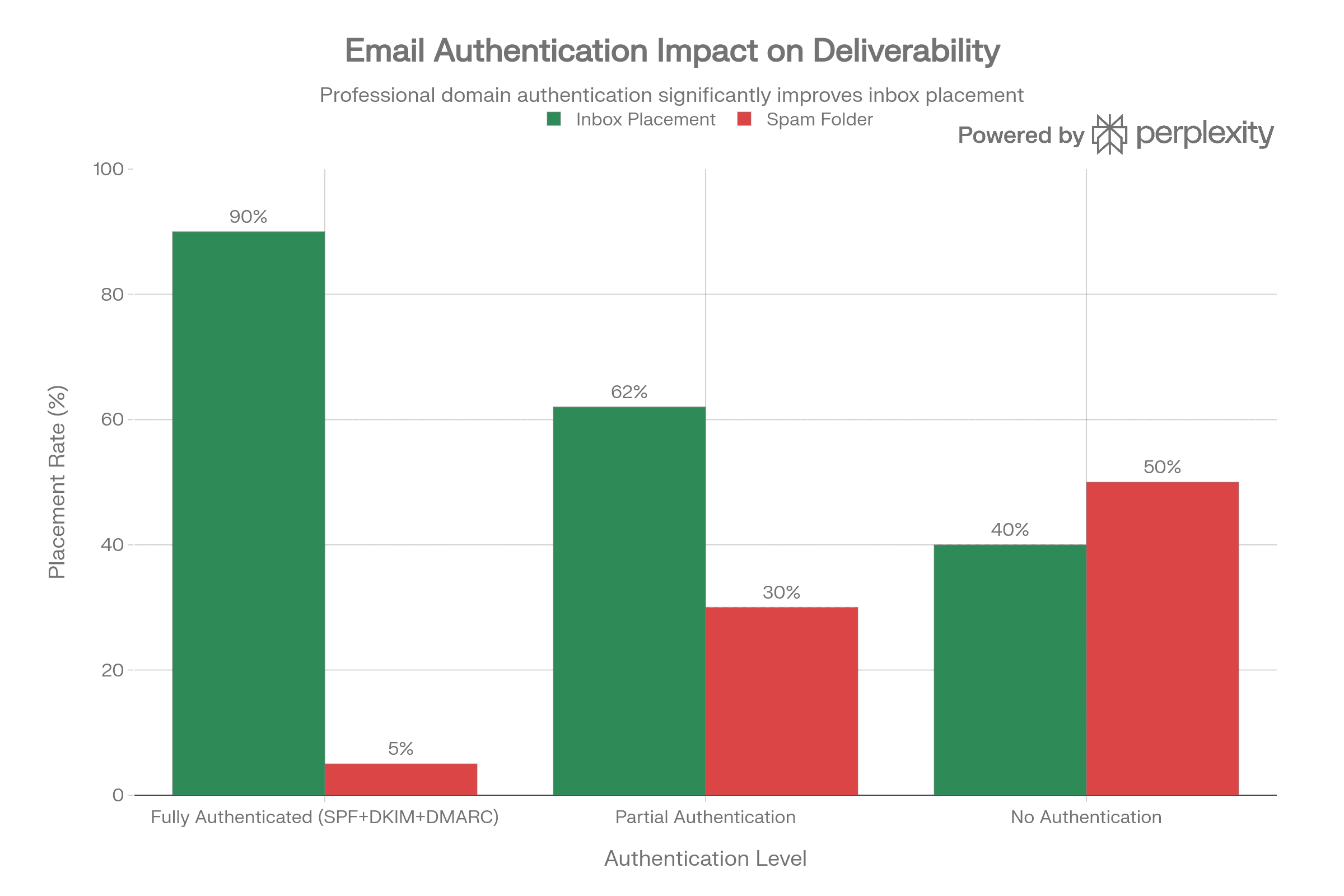
Inbox providers aggressively filter mail to protect users. Authenticated, business‑grade domains enjoy better inbox access than generic or suspicious senders.
Industry deliverability data shows:
Properly authenticated custom domains (with SPF, DKIM, DMARC set up) often hit the inbox 85–95% of the time.
Unauthenticated or low‑reputation senders often see only 30–50% of emails land in the inbox, with the rest filtered to spam or promotions.
Free accounts (especially brand‑new Gmail/Yahoo addresses sending business‑like messages) resemble the accounts spammers churn through. Filters treat them accordingly.
If you send 10 quotes from a free account, it’s realistic that 3–5 never reach the primary inbox at all.
2. Human trust filtering: what happens when they do see your address
Now consider the emails that do arrive.
Consumers consistently report that free addresses make a business look less professional and less trustworthy.
Articles synthesizing the same survey data note that a free address “breeds skepticism” and makes people think twice before sharing personal or payment information.
That skepticism shows up as:
deleting your quote without reading
ignoring your follow‑up
choosing the competitor whose email “felt more legitimate”
Put the two filters together and your “10 leads → 3 replies → 1 booking” pattern looks a lot less mysterious:
10 people submit an inquiry.
3–5 never see your email because of filtering.
Of the rest, a chunk instantly distrusts the “@gmail.com” sender and never engages.
Only 2–4 actually reply or ask questions.
Maybe 1 books.
On the spreadsheet, this looks like “weak leads.” In reality, you’re leaking opportunity at the infrastructure level.
What I’ve seen with clients: stubborn first, convinced later
Working with founders across different industries, I’ve watched this play out many times.
A business launches (mobile bartending, home services, consulting, you name it).
The owner wires their personal Gmail to every touchpoint and answers all leads from that address.
A month or two later, the complaints start:
“These leads are bad.”
“Everyone ghosts.”
“We close maybe 1 in 10 if we’re lucky.”
In reality, the pattern usually looks like this:
Free email address as the main face of the business.
Response times measured in hours or days, not minutes.
No structured follow‑up-just one quote and hope.
Once they finally agree to test a different approach-switching to their domain email, tightening response times, adding even a light follow‑up cadence-their conversion math starts to change:
More people actually open and respond to the first email.
Response rates move from “3 out of 10” toward “6–7 out of 10.”
Bookings double or triple from the same lead volume.
Nothing else changed-just their email identity and how they responded.
Best practices: how to set this up correctly from day one
If you’re planning a new business, or quietly frustrated with how your current leads perform, here’s the practical playbook.
1. Buy the domain and use it everywhere
Choose a domain that matches your brand (yourbrand.com).
Create at least one clean, professional address:
With your provider, enable basic authentication (SPF, DKIM, DMARC) so inboxes treat you as a legitimate sender.
Use that address consistently:
On your website and contact forms
On your Google Business Profile and directories
On your social profiles
On every quote, invoice, and receipt
You’re training both humans and algorithms to recognize you as a real brand.
2. If you love Gmail, keep it-just change what clients see
Most resistance to professional email is really resistance to another interface.
You don’t need a separate, clunky inbox:
Set up forwarding so hello@yourbrand.com delivers into your existing Gmail inbox.
In Gmail settings, configure “Send mail as” so when you reply, the From line shows hello@yourbrand.com to your clients.
You keep your current workflow. Clients only ever see the professional identity.
3. Decide on a response‑time standard
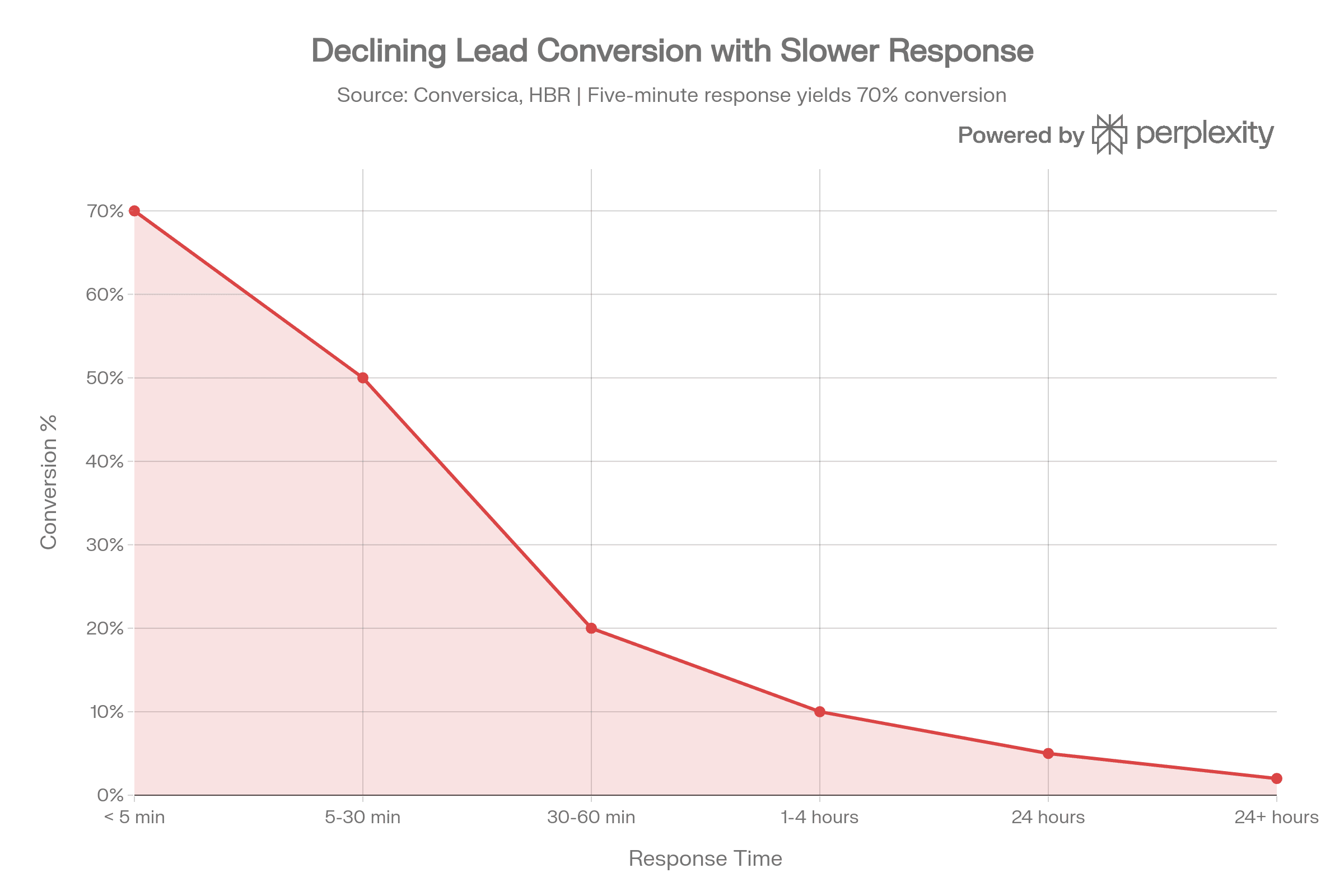
High‑performing businesses don’t rely on “I’ll answer when I can.” They work from explicit response‑time targets.
Response Time | Conversion Rate | Relative Performance |
|---|---|---|
Within 5 minutes | ~70% | Baseline (optimal) |
Within 30 minutes | ~50% | -20 percentage points |
Within 1 hour | ~20% | -50 percentage points |
Within 24 hours | ~5% | -65 percentage points |
After 24 hours | ~2% | -68 percentage points |
You don’t need enterprise‑grade SLAs, but you do need clarity:
During business hours, aim to acknowledge every new inquiry within 5–15 minutes.
After hours, have an automated response that sets expectations (“We’ve received your request and will send your custom quote between 8–10am tomorrow.”).
Lead‑response research shows that contacting a lead within minutes makes you dramatically more likely to qualify and convert them compared to waiting an hour or more.
You don’t need to have the perfect proposal ready in 5 minutes. You do need to let them know a real person is on it.
4. Build one simple quote template
Don’t start from zero every time. Create one or two quote templates in your business inbox.
Subject:
“Custom [Service] Quote for [Event/Date]”
Body (structure):
Thank them by name.
Reflect back their details (date, guest count, location, service type).
Present 1–2 clear package options.
Spell out what’s included (so there are no surprise fees).
Give a single, obvious next step:
“Reply YES to hold your date,”
or “Click here to schedule a 10‑minute call,”
or “Use this link to secure your booking with a deposit.”
Close with a complete professional signature.
The combination of speed, clarity, and a credible sender address does most of the heavy lifting.
5. Follow up at least once
A prospect who doesn’t reply immediately isn’t automatically a “no.” They’re busy, distracted, or still comparing options.
At minimum, bake this into your process:
48‑hour follow‑up:
“Hi [Name], just wanted to check in and see if you had any questions about the quote for [date]. I can hold that date for 48 more hours if you’re close to deciding.”
Many small businesses simply never send this email. Adding it-again, from a professional address-rescues opportunities that would otherwise vanish.
Why this matters if you care about your CAC
Even if you’re not thinking in “CAC” language yet, you are paying to acquire attention—through ads, time, or effort.
If that’s true, then:
Using a free email and replying slowly means you’re paying for leads you’re structurally unlikely to convert.
Moving to a domain email and tightening your response process means you get more revenue from every lead you already have.
Simple example:
100 leads/month at $20 per lead = $2,000 in “attention spend.”
At 10% conversion, you book 10 customers.
At 20–25% conversion-very realistic once your identity and process are tuned—you book 20–25 customers from the same $2,000.
No extra ad dollars. Just better execution.
Final thoughts for founders
You don’t have to turn email into a big project.
You don’t need a martech stack, a 40‑page SOP, or a full‑time marketer.
You do need to:
Stop letting a free email address represent your business.
Decide how quickly you’ll respond to new leads.
Make it easy for people to say “yes” once they like what you do.
If you’re in the “for every 10 leads, only 1 books” camp, treat this as an experiment: give your business a proper email identity and a simple response standard, run it for 60–90 days, and compare the before/after.
Odds are, the problem wasn’t the leads. It was how you were talking back to them.
I’m not sharing this as theory. Over the years, I’ve watched multiple founders go from “10 leads, 1 booking” to healthy, predictable pipelines simply by tightening these basics-professional email identity, faster replies, and a simple follow‑up rhythm.
If you’re serious about growing your business, don’t let a free email address and slow replies undermine the leads you’re already paying for. Give your brand a proper email identity, respond fast, and work a simple follow‑up cadence-you’ll be surprised how quickly “bad leads” start turning into booked clients.
About the Author
Bryan is a strategic hybrid advisor and fractional C‑suite partner who’s spent the last two decades reverse‑engineering companies from the inside out, from lending and financial services to founder‑led startups and growth‑stage businesses. He’s seen “bad leads” blamed for what was really broken communication, slow response, and weak systems, and has helped owners dramatically improve bookings simply by tightening basics like professional email identity, speed‑to‑lead, and follow‑up. When he talks about closing execution gaps, it’s from lived experience, not theory.